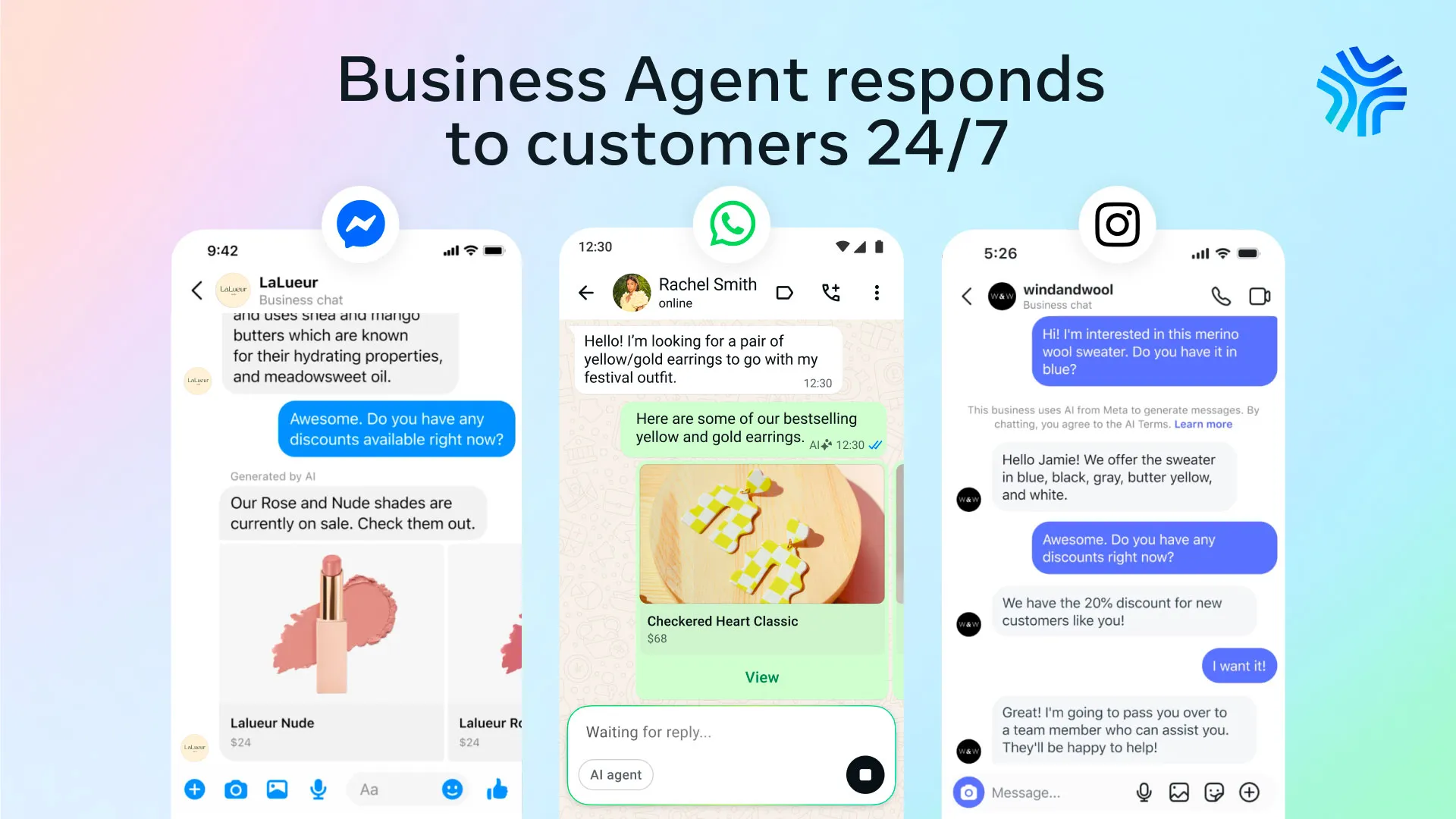
AI chatbot products are entering a more serious phase. The conversation is no longer only about clever prompts, human-like answers, or whether a bot can sound friendly. Meta’s new Business Agent points to a different future, one where AI sits inside existing customer conversations and helps businesses respond, recommend, book, qualify, summarize, and hand off with less friction.
The most interesting part of Meta’s Business Agent is not that Meta launched another AI chatbot. The more important product decision is placement.
Meta is not asking users to download a new app, visit a new website, or learn a new interface. The agent is being placed inside WhatsApp, Messenger, Instagram, and Meta Business Suite, where businesses and customers already communicate. Meta says there are more than one billion active threads with businesses across WhatsApp, Messenger, and Instagram every day, and more than one million businesses are already using a Meta Business Agent on WhatsApp and Messenger.
The future of AI chatbot UX may not be another destination. It may be intelligence placed inside the conversations people already have.
The UX story is not the chatbot. It is where the chatbot lives.
Many AI products still ask users to begin from a blank screen. Open the tool. Type a prompt. Figure out what the system can do. That works for open-ended products like ChatGPT, where exploration is part of the experience.
Business messaging is different. When someone messages a business, they usually have a specific need. They want to know if a product is available. They want to book an appointment. They want help with an order. They want a fast answer before they make a decision.
Meta is not treating the AI chatbot as a separate destination. It is embedding AI into existing behavior. From a product design perspective, reducing behavior change may be more powerful than adding another feature.
Why most AI chatbots still feel frustrating
The problem with many chatbots is not that they sound robotic. The problem is that users often have no idea what the chatbot actually knows, what it can do, or where its limitations begin. When expectations and reality drift too far apart, frustration follows quickly.
A traditional interface gives users structure. Navigation, buttons, filters, labels, forms, and confirmation states all communicate what is possible. A chatbot removes much of that visible structure and replaces it with language.
Language feels flexible, but it can also feel uncertain. If the assistant can recommend products, users need to understand why those recommendations appear. If it can book an appointment, users need clear confirmation. If it cannot resolve an issue, the handoff to a human should feel intentional, not like the system failed.
Unclear limits, vague responses, hidden rules, poor handoff, and no confirmation.
Clear expectations, visible actions, safe escalation, and task completion.
Recommended reading for AI product designers
UX for AI: A Framework for Designing AI-Driven Products
A useful book for UX designers who want to understand AI product design, explainability, user trust, human control, and how to create AI experiences that feel helpful instead of confusing.
View on AmazonMeta’s strongest UX move is not the chatbot. It is the workflow.
Meta’s official announcement describes the Business Agent as more than a response tool. It can answer business-specific questions, recommend products from a catalog, qualify leads, book appointments, close sales, and determine when a human should take over.
That matters because most legacy chatbots were built around deflection. Their job was to keep users away from human support for as long as possible. Users felt that immediately. They learned to type “representative” or “human” because the chatbot felt like an obstacle.
Meta’s Business Agent is being positioned differently. It is not only answering questions. It is being designed to help complete tasks. The value of an AI chatbot is not measured by how long the conversation lasts. It is measured by whether the conversation moves the user closer to a completed outcome.
“Can I book an appointment?”
“Which product is right for me?”
| Layer | UX role | Product value |
|---|---|---|
| Conversation | Captures intent | Reduces search and navigation friction |
| AI agent | Interprets and acts | Moves the task forward |
| Human support | Handles complexity | Protects trust when automation is not enough |
The morning briefing may be the most important UX detail
One of the most overlooked parts of Meta’s announcement is the morning briefing feature. Meta describes a future where the Business Agent can summarize overnight conversations and surface useful insights for business owners.
That detail changes the product story. The AI is not only helping the customer. It is helping the business understand what happened while they were away. In product design terms, the conversation becomes raw material. The real interface is not just the chat window. It is the layer of intelligence created from many conversations over time.
For small businesses, that could be meaningful. A salon owner, consultant, doctor’s office, local shop, or service provider may not need another dashboard filled with analytics. They may need a simple summary: what customers asked, what opportunities appeared, what needs follow-up, and what patterns are emerging.
The chat experience may be customer-facing, but the deeper product value may appear on the business side, summaries, insights, follow-ups, and decisions created from everyday conversations.
Conversation is becoming the interface
For years, digital product design has been organized around screens. Designers mapped flows, created wireframes, tested prototypes, and refined visual systems. Those skills still matter, but AI introduces a different type of interface: conversation.
Conversation changes the relationship between user and product. Users can ask follow-up questions, change direction, add context, and describe what they want in their own language.
That flexibility is powerful, but it also creates risk. A poorly designed AI chatbot can sound confident while being wrong. It can provide too much information, too little context, or an answer that feels helpful but does not move the task forward.
This is why conversational UX cannot be treated as copywriting alone. It requires product thinking. Designers must understand the task, the user’s mental model, the business rules, the handoff points, and the moments where trust can break.
Conversations with Things: UX Design for Chat and Voice
This book is useful for designers interested in conversational interfaces, chatbots, voice assistants, dialogue design, and how people communicate with digital systems.
View on AmazonThe next UX challenge is trust
As AI chatbots begin to do more than answer basic questions, trust becomes the central design problem.
Booking an appointment is different from explaining store hours. Recommending a product is different from linking to a help article. Qualifying a lead is different from answering a simple FAQ. The moment an AI chatbot begins taking action, the user needs stronger signals that the system understands the request correctly.
1. Recommendations need context
If an AI chatbot recommends a product, users should understand whether the suggestion comes from availability, preference, price, popularity, or business rules.
2. Bookings need confirmation
When a chatbot schedules something, the confirmation state must be unmistakable. Ambiguity turns convenience into anxiety.
3. Handoffs need dignity
A human transfer should not feel like a failure. It should feel like the system recognized the moment needed more care.
4. Automation needs boundaries
The more an AI agent can do, the more clearly the experience must show permission, limits, and recovery paths.
The security lesson UX designers should not ignore
Meta’s AI rollout is also arriving alongside a serious reminder: when AI systems are allowed to take action, safeguards become part of the user experience.
Reuters recently reported on a security issue involving a Meta AI support chatbot that was manipulated into helping attackers gain access to high-profile Instagram accounts. Meta said the issue was resolved, but the case highlights an important point for product teams: AI automation cannot be treated as a neutral layer when it touches identity, access, payments, or personal data.
For UX designers, this is not only a technical concern. It is a design concern. The user journey must include verification, permission, escalation, and human review at the right moments.
AI should reduce friction, but not at the cost of safety.
What UX designers can learn from Meta’s launch
Meta’s Business Agent is worth studying because it shows how AI chatbot design is moving from novelty to infrastructure. The future is not just a chatbot placed in the corner of a website. It is AI woven into the places where customer decisions already happen.
The Future of AI Chatbot Design
The most interesting part of Meta’s announcement was not the chatbot itself. It was the idea that conversations can become a source of insight.
For years, businesses have relied on dashboards, reports, surveys, and analytics platforms to understand their customers. Meta is suggesting that everyday conversations may become just as valuable, revealing patterns, opportunities, and questions that traditional reports often miss.
That changes the role of the AI chatbot. Instead of serving only as a customer support tool, it becomes a layer between customers, businesses, and decision-making. Whether Meta’s vision succeeds remains to be seen, but it points to a future where the value of an AI chatbot is measured not only by the quality of its responses, but by what organizations learn from the conversations it helps create.
- Meta for Business, Conversations 2026: Introducing Meta Business Agent
- Meta Newsroom, Be There for Every Customer With Meta Business Agent
- Reuters, Meta enters enterprise AI race with new business agent
- TechCrunch, Meta’s AI agent for WhatsApp Business is now available globally
- Financial Times, Meta bets on AI agents to unlock WhatsApp revenues
- Reuters, High-profile Instagram AI chatbot breach spotlights security risks of automation